API Documentation PlanningNow
A guide to integrating with our API.
Important Note on API Structure
This API is designed for managing orders, work schedules, and cost centres. Please be aware that the endpoints and data structures outlined in this documentation are definitive. External systems intending to integrate must adapt to the specified request and response formats, as the API structure will not be customized for individual integrations.
1. Create and Manage API Tokens
API tokens are managed on a per-user basis. Each user can have only one active API token. Follow these steps to create a token for a specific user:
Step 1: Navigate to User Management
First, go to
User Management
in your PlanningNow web app and select the user for whom you
want to generate or manage an API token.
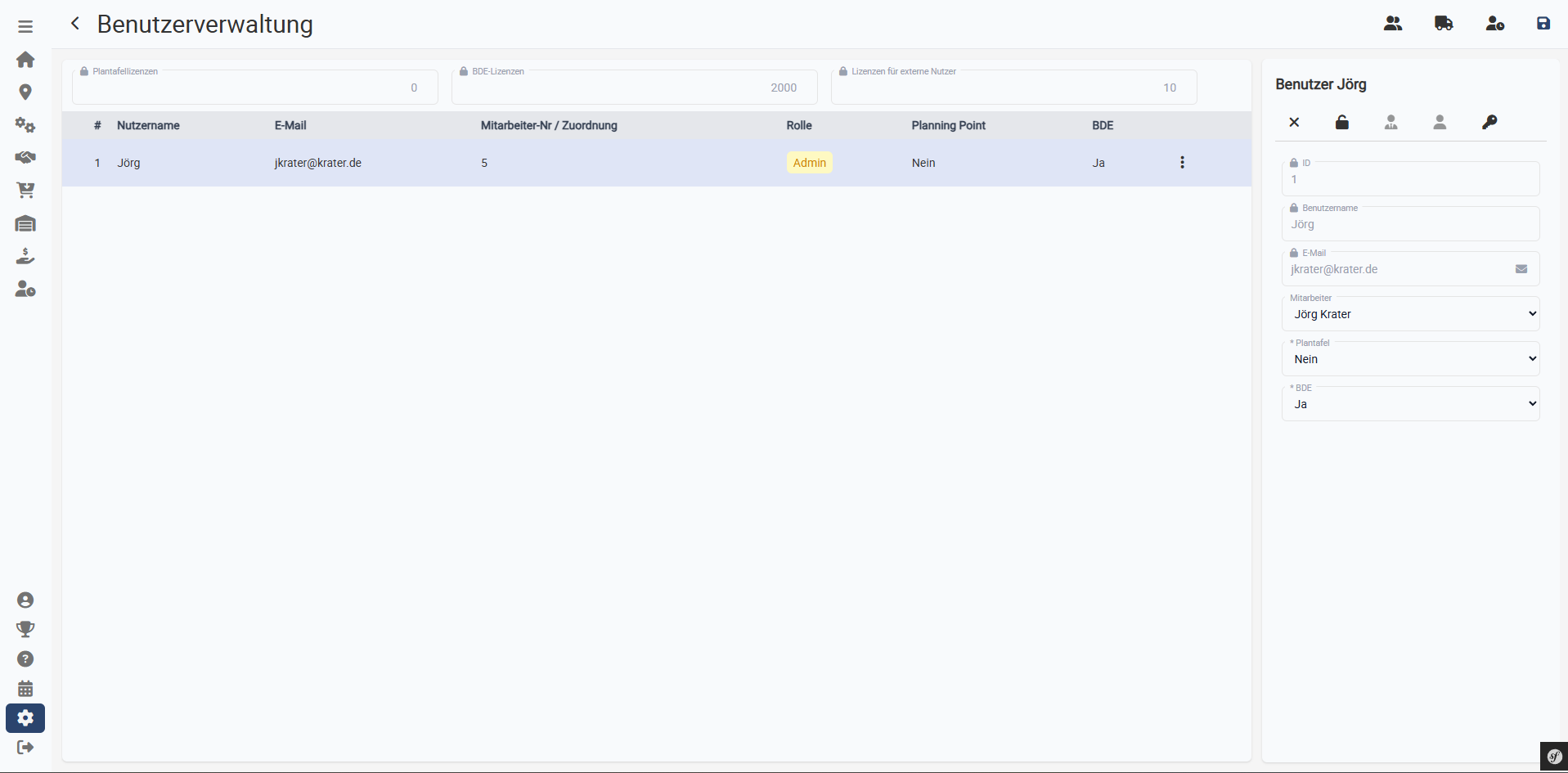
Select the desired user account.
Step 2: Access API Key Settings
With the user selected, click on the
API Key
icon located in the right sidebar to open the token management
interface.
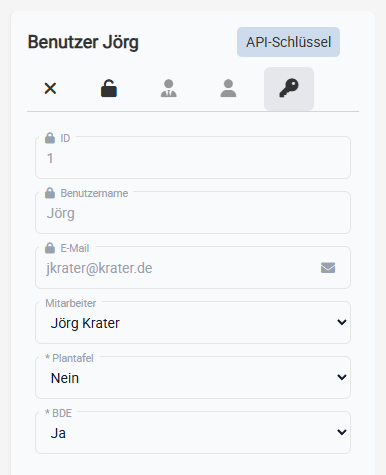
Click the icon to manage the user's API token.
Step 3: Generate a New Token
In the token management overview, click the "Add" button on the right to generate a new API token. If a token already exists, you may need to revoke it first.
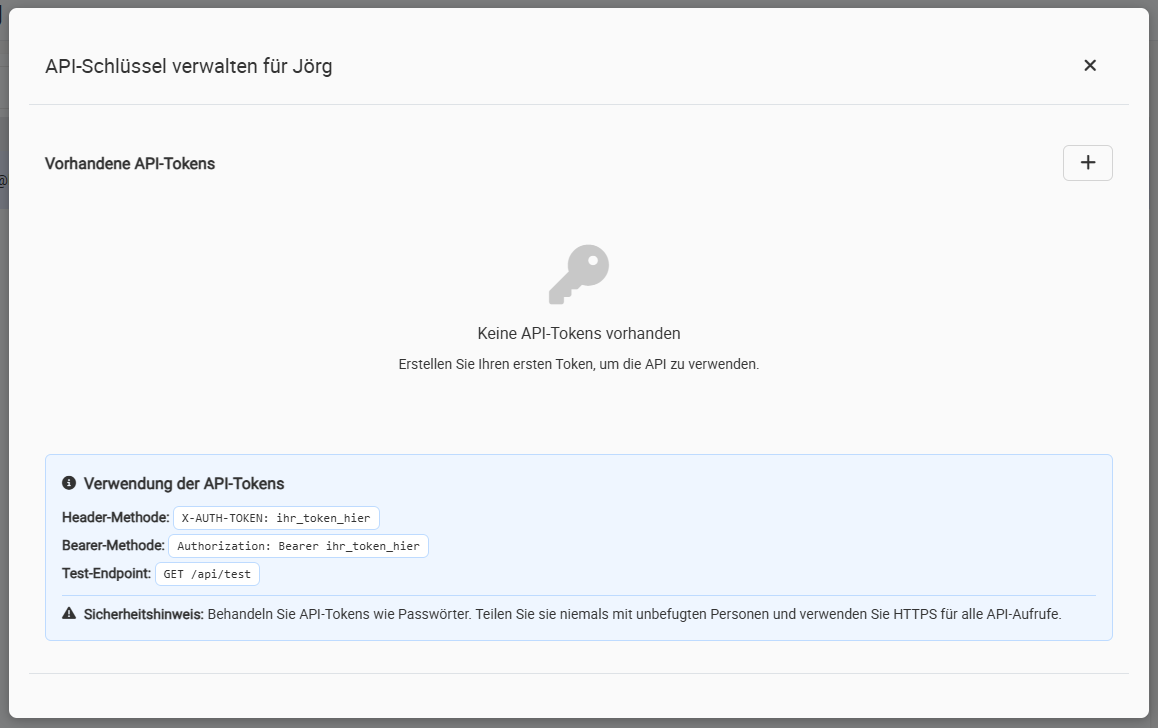
The token management overview.
Step 4: Copy Your New Token
The newly generated token will be displayed. This is the only time the token will be shown. Copy it and store it in a secure location. If you lose the token, you will need to revoke it and generate a new one.
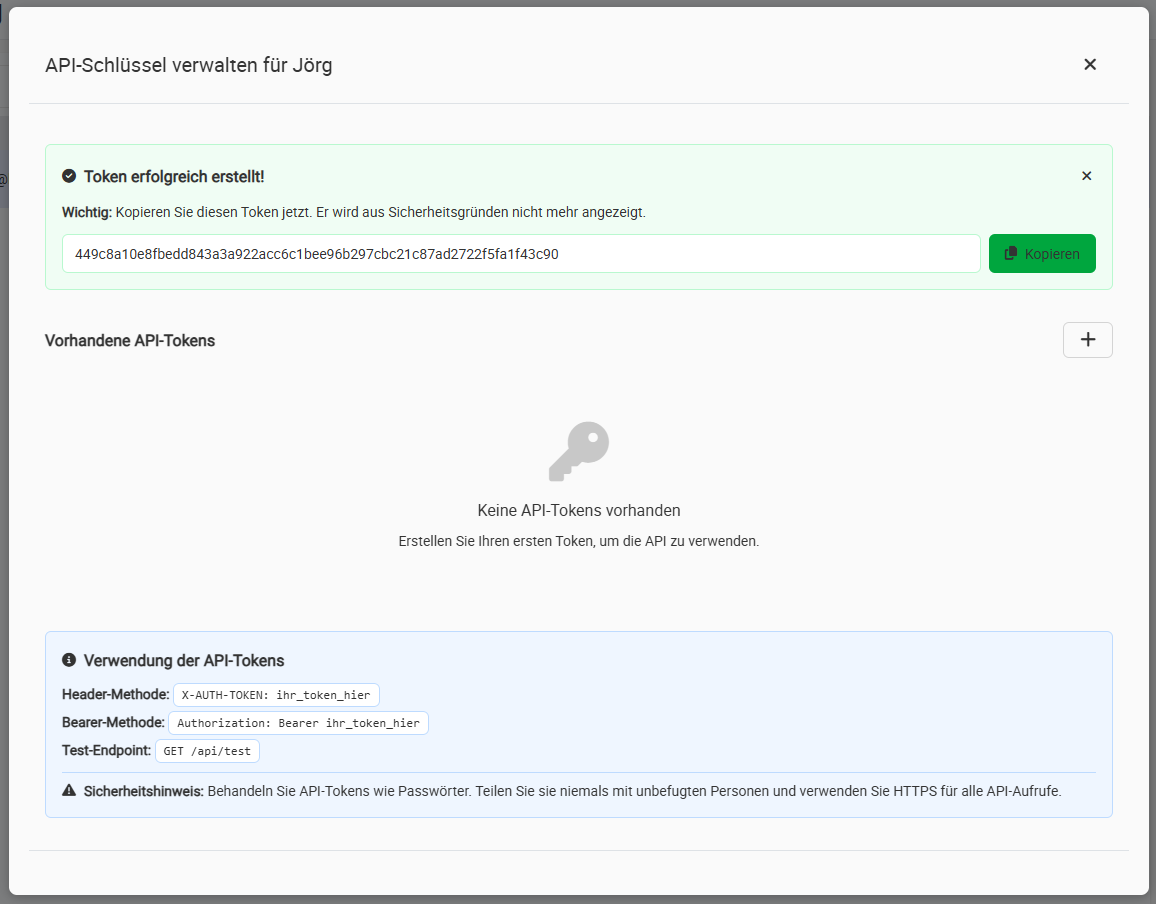
Your new API token.
2. Using Your API Token
To authenticate your requests, you must send the API token in the
HTTP header with every request. Use the header key
X-AUTH-TOKEN.
Example Header:
X-AUTH-TOKEN: your_personal_api_token_hereAPI Endpoints
Order Management
Retrieves a list of all order confirmations in the system.
Example Response (200 OK):
[
    {
        "id": 3456,
        "o_conf_date": "2025-08-15",
        "employee_no": 101,
        "employee_name": "John Doe",
        "customer_no": 1234,
        "customer_name": "Example Corp",
        "project_no": "PROJ-2025-Q3",
        "subject": "Manufacturing services agreement",
        "netto": "8500.00",
        "ges_brutto": "10115.00"
    },
    {
        "id": 3457,
        "o_conf_date": "2025-08-20",
        "employee_no": 102,
        "employee_name": "Jane Smith",
        "customer_no": 5678,
        "customer_name": "Tech Industries",
        "project_no": "PROJ-2025-Q4",
        "subject": "Consulting services",
        "netto": "12000.00",
        "ges_brutto": "14280.00"
    }
]Retrieves the details of a specific order using its unique ID.
Example Response (200 OK):
{
    "id": 4711,
    "o_conf_date": "2025-09-11",
    "customer_no": 1234,
    "customer_name": "Example Corp",
    "project_no": "PROJ-2025-Q4",
    "subject": "Q4 Production Run",
    "netto": "1575.00",
    "ges_brutto": "1874.25",
    "positions": [
        {
            "id": 1,
            "pos_no": 1,
            "article_number": "ART-001",
            "article_desc": "Main Component Assembly",
            "amount": "50.00",
            "unit": "pcs",
            "unit_price": "25.00",
            "netto": "1250.00",
            "deliv_date": "2025-10-15",
            "tasks": [
                {
                    "id": 101,
                    "cost_centre_name": "Assembly Line 1",
                    "activity_name": "Component Welding",
                    "min_ruest": "30.00",
                    "min_wage": "5.50",
                    "min_masch": "7.20",
                    "production_start": "2025-09-20T08:00:00Z",
                    "production_end": "2025-09-20T16:30:00Z"
                }
            ]
        }
    ]
}Creates a new order with the data provided in the request body.
Example Request Body:
{
    "o_conf_date": "2025-09-11",
    "customer_no": 5678,
    "project_no": "NEW-PROJ-01",
    "subject": "Initial Prototype Order",
    "delivery_date": "2025-11-01",
    "positions": [
        {
            "pos_no": 1,
            "article_number": "PROTO-X1",
            "article_desc": "Prototype Mainframe",
            "amount": "5.00",
            "unit": "pcs",
            "unit_price": "550.00",
            "remarks": "Handle with care, urgent delivery."
        }
    ]
}Updates an existing order. Any field of the order, its positions, or tasks can be updated.
Example Request Body:
{
    "subject": "Q4 Production Run (Revised)",
    "delivery_date": "2025-10-20",
    "short_info": "Delivery date expedited per customer request."
}Permanently deletes an order from the system. This action cannot be undone.
Example Response (204 No Content):
On successful deletion, no body is returned.
Offer Management
Retrieves a list of all offers in the system.
Example Response (200 OK):
[
    {
        "id": 2345,
        "offer_date": "2025-09-05",
        "customer_no": 1234,
        "customer_name": "Example Corp",
        "project_no": "PROJ-2025-Q3",
        "subject": "Initial project proposal",
        "netto": "2500.00",
        "ges_brutto": "2975.00"
    },
    {
        "id": 2346,
        "offer_date": "2025-09-10",
        "customer_no": 5678,
        "customer_name": "Tech Industries",
        "project_no": "PROJ-2025-Q4",
        "subject": "Advanced manufacturing proposal",
        "netto": "5000.00",
        "ges_brutto": "5950.00"
    }
]Retrieves the details of a specific offer using its unique ID.
Example Response (200 OK):
{
    "id": 2345,
    "offer_date": "2025-09-05",
    "customer_no": 1234,
    "project_no": "PROJ-2025-Q3",
    "lead_text": "Initial project proposal",
    "followup_text": "Follow-up discussion required",
    "date_desired": "2025-10-01",
    "delivery_date": "2025-10-15",
    "netto": "2500.00",
    "ges_netto": "2500.00",
    "ges_rabatt": "0.00",
    "info": "Special pricing for bulk order",
    "pay_term_id": 1,
    "pay_term_text": "Net 30 days",
    "positions": [
        {
            "id": 1,
            "pos_no": 1,
            "article_number": "COMP-001",
            "article_desc": "Main Component",
            "amount": "25.00",
            "unit": "pcs",
            "unit_price": "100.00",
            "discount": "0.00",
            "unit_price_disc": "100.00",
            "netto": "2500.00",
            "deliv_date": "2025-10-15",
            "mwst_percent": "19.00",
            "brutto": "2975.00",
            "tasks": [
                {
                    "id": 101,
                    "kalk_id": 1,
                    "cost_centre_name": "Assembly Line 2",
                    "activity_name": "Component Assembly",
                    "min_ruest": "20.00",
                    "min_wage": "3.50",
                    "min_masch": "5.00"
                }
            ]
        }
    ]
}Creates a new offer with the data provided in the request body.
Example Request Body:
{
    "offer_date": "2025-09-25",
    "customer_no": 9876,
    "project_no": "NEW-OFFER-01",
    "lead_text": "Initial consultation and proposal",
    "delivery_date": "2025-11-30",
    "pay_term_text": "Net 45 days",
    "positions": [
        {
            "pos_no": 1,
            "article_number": "SERV-X1",
            "article_desc": "Consulting Services",
            "amount": "20.00",
            "unit": "hrs",
            "unit_price": "125.00",
            "remarks": "Senior consultant rate applies."
        }
    ]
}Updates an existing offer. Any field of the offer, its positions, or tasks can be updated.
Example Request Body:
{
    "lead_text": "Updated proposal with revised requirements",
    "delivery_date": "2025-12-15",
    "info": "Delivery date extended per customer request."
}Permanently deletes an offer from the system. This action cannot be undone.
Example Response (204 No Content):
On successful deletion, no body is returned.
Work Schedules
Retrieves a specific work schedule.
{
    "id": 101,
    "name": "Standard Assembly Process",
    "creation_date": "2025-01-10",
    "sum_cost": "125.50",
    "los_stueck": 1,
    "positions": [
        {
            "id": 201,
            "pos": 10,
            "cost_centre_name": "Milling Department",
            "activity_name": "CNC Milling Part A",
            "min_ruest": "15.00",
            "min_wage": "2.50",
            "sum_cost_wage": "12.50",
            "min_masch": "10.00",
            "sum_cost_masch": "20.00"
        }
    ]
}Creates a new work schedule.
{
    "name": "Advanced Finishing Process",
    "los_stueck": 1,
    "wage_factor": 1,
    "positions": [
        {
            "pos": 10,
            "activity_name": "Sanding and Polishing",
            "min_wage": "20.00"
        }
    ]
}Updates an existing work schedule.
{
    "name": "Standard Assembly Process (2025 Rev.)"
}Permanently deletes a work schedule.
Example Response (204 No Content):
On successful deletion, no body is returned.
Cost Centres
Retrieves a specific cost centre.
{
    "id": 1,
    "name": "CNC Milling Dept.",
    "type": 1,
    "kalk_min_kosten": "1.850",
    "nutzungsdauer": "10.00"
}Creates a new cost centre.
{
    "name": "Quality Assurance Lab",
    "type": 2
}Updates an existing cost centre.
{
    "kalk_min_kosten": "2.150"
}Permanently deletes a cost centre.
Example Response (204 No Content):
On successful deletion, no body is returned.
General
This endpoint is used to verify the correct authentication with the API token. On success, a confirmation message is returned.
Example Response (200 OK):
{
    "status": "success",
    "message": "Authorization successful."
}